Results You Can Defend
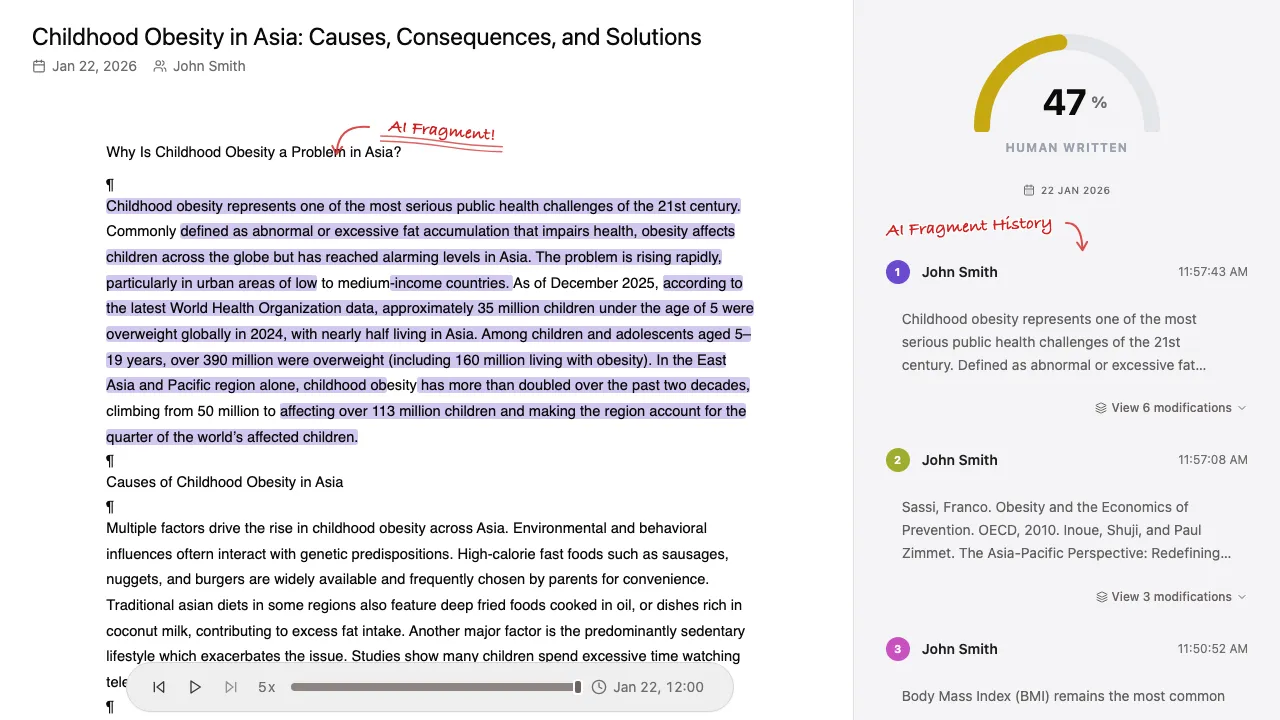
Every flag points at specific edits, with timestamps. Open them, watch what happened, and show a student or a colleague exactly what the report is based on.



Trust the writing process. See what AI wrote, when, and how much was revised.
No Chrome extension needed Works in any browser
The interactive demo is best experienced on a larger screen.
Connect your account, select a document, let Turingo investigate, and inspect the results. The analysis is automated, so you decide in seconds which documents deserve a closer look.
Existing detectors guess whether text looks AI-generated. Turingo shows how the document was actually written, edit by edit.
Every flag points at specific edits, with timestamps. Open them, watch what happened, and show a student or a colleague exactly what the report is based on.
Replay the document word by word and see what was added, by whom, and when. Detected AI writing is flagged automatically, so you can jump straight to it.
See exactly how much each collaborator contributed and how much of their writing was AI-generated.
Turingo does the watching for you. Open the report, see what was flagged, and pass it on without the back and forth.
Every document change is tracked and summarized automatically, turning hours of replay watching into seconds of analysis.
Generate a public report link that anyone can view without signing up or logging in.
Nothing to install and no Chrome extension. Connect Turingo to an account you own and select the documents you have edit access to. Turingo reads the revision history they already keep.

Any Google Doc in your Drive, including student work shared with you and Google Classroom assignments.

Word documents shared with you through your institution's Microsoft 365 workspace, including student work. Available for institutions on request.
Watch how the document was written, word by word, at your own pace. Chrome, Firefox, Safari or Edge, nothing to install.
Open the free Google Docs replay toolWe are a team of educators, engineers and researchers on a mission to bring back transparency to education through technology.
“We needed a different approach, one where AI detection could be reviewed and justified, not just accepted on blind trust. No existing AI detector could do this, so we naturally decided to build one ourselves.”
Have more questions? We're here to help. Don't hesitate to contact us.
Turingo is an automated document-analysis platform that detects AI-generated content by analyzing revision history.
Turingo was designed for educators and institutions, and can also support students, authors, and editorial teams.
Turingo analyzes the document's revision history for suspicious insertions and editing behavior, instead of judging only the final text. It can only see writing that happens inside the document, so text written elsewhere and pasted in shows as pasted, with no record of how it was written. The replay shows exactly when and where each paste happened.
No. Turingo flags suspicious edits automatically and takes you straight to them, so reviewing a scan takes seconds, not hours. The full word-by-word replay is always available when you want to inspect the context around a flagged edit yourself.
Documents created in Google Docs are supported on all plans. Uploaded files, including Word files converted to Google Docs, can't be analyzed because their history only starts at upload. Institutions on the Enterprise plan can also scan Microsoft Word documents shared through their Microsoft 365 workspace.
Any Google Doc you have edit access to. Turingo reads Google Docs revision history, so other files stored in Drive, such as Word documents and PDFs, can't be scanned. You pick documents one by one, without granting access to your whole Drive.
No. Turingo runs in your browser and works in Chrome, Firefox, Safari and Edge. You connect your Google account and pick a document, with nothing to install.
Turingo supports many languages because its revision-history analysis is not language-specific.
Yes. Turingo offers a seven-day trial with a limited analysis quota.
Turingo processes only the revision history of documents explicitly selected for analysis and does not store full document content.
Join educators and institutions who trust the writing process, not just the final draft.