


AI tools are becoming more capable and more widely used each year. But students differ in how much they rely on them. To understand a student’s contribution, especially in group projects, educators need to give the writing process as much attention as the finished document.
As educators at Turingo, we believe teachers should be able to investigate not only when AI may have been used, but also how much it contributed to the submitted work. For a pasted passage, that means looking at what happened after it arrived: which parts the student rewrote and what they removed.
To this end, we’ve designed Turingo to track later edits and deletions to flagged passages. As you replay the document, Turingo shows how much of the analyzed draft was written organically, expressed as a “human-written” percentage.
In this article, we’ll compare how Turingo, Draftback, Turnitin Clarity and GPTZero track passage changes, measure a student’s contribution and display the document.
Writing-process tools at a glance
| Tool | Document access and setup | Following a pasted passage | Review workflow |
|---|---|---|---|
| Draftback | Chrome extension; documents opened manually in Google Docs | Follow edits manually through playback; no confirmed tracking of later edits linked to the original paste | Replay, statistics, and reviewer interpretation |
| Turnitin Clarity | Institution’s LMS; writing recorded automatically in Clarity assignments, with reports generated after submission | Labels whether each external paste changed; document edits can be reviewed in the general replay | Replay, assignment reports, and institutional tools |
| GPTZero | Chrome extension for Google Docs replay; documents opened manually in Google Docs | Attributed paste cards and replay; no confirmed tracking of later edits linked to the original paste | Replay, typing analysis, and AI-detection tools |
| Turingo | No extension; Google Docs documents selected directly in Turingo and viewable in any browser | Linked history of each tracked passage’s later edits and deletions, with direct access to each revision | Replay with formatting, passage investigation, and a score based on surviving tracked content |
Follow a passage through its edits and deletion
To understand how these tools differ, let’s follow Maya, a student writing a proposal to improve her school’s courtyard as part of an assignment. She writes a short introduction, then pastes in three sentences generated by AI. We’ll see what happens as she rephrases three words in the middle and eventually deletes the passage.
Following common editing conventions, the examples highlight inserted text and use strikethrough for deletions. Purple marks the original paste in Turingo; green marks insertions in the basic edit view.
The cards are illustrations, not product screenshots. They use a shared insertion/deletion view for the competitors, whose individual features are covered in the tool comparisons below. N/A applies to the specific history-based human-written percentage used here.
1. Insertion: a passage enters the document
Maya types the heading and opening observation, then pastes three sentences at once. Both views show the insertion. Turingo records the author and time and keeps a history for this passage. Its human-written score starts at 19%, counting the typed introduction as part of the document.
Courtyard proposal
At noon, students gather outside.
Students gather outside in the courtyard during their lunch breaks. The courtyard needs more shaded seating near the main entrance. This would give everyone a comfortable place to rest and spend time with friends on warm days.
Courtyard proposal
At noon, students gather outside.
Students gather outside in the courtyard during their lunch breaks. The courtyard needs more shaded seating near the main entrance. This would give everyone a comfortable place to rest and spend time with friends on warm days.
2. Modification: three words change in the middle
She replaces “more shaded seating” with “additional covered benches,” typing the new words herself. The basic edit view crosses out the old words and colors the replacement green. In Turingo, the removed words are crossed out and the unchanged parts of the paste keep their purple highlight. The newly typed words are unhighlighted, and the score rises to 28%.
Courtyard proposal
At noon, students gather outside.
Students gather outside in the courtyard during their lunch breaks. The courtyard needs more shaded seating additional covered benches near the main entrance. This would give everyone a comfortable place to rest and spend time with friends on warm days.
Courtyard proposal
At noon, students gather outside.
Students gather outside in the courtyard during their lunch breaks. The courtyard needs more shaded seating additional covered benches near the main entrance. This would give everyone a comfortable place to rest and spend time with friends on warm days.
3. Deletion: the passage goes, its history stays
Maya decides she doesn’t want the AI-generated passage in her proposal after all, so she removes it completely. Her typed heading and observation remain, so the score reaches 100%. Turingo still keeps the record of who introduced the passage and how it changed. Both views show the removed text crossed out. That text belongs to the history and no longer contributes to the score.
Courtyard proposal
At noon, students gather outside.
Students gather outside in the courtyard during their lunch breaks. The courtyard needs additional covered benches near the main entrance. This would give everyone a comfortable place to rest and spend time with friends on warm days.
Courtyard proposal
At noon, students gather outside.
Students gather outside in the courtyard during their lunch breaks. The courtyard needs additional covered benches near the main entrance. This would give everyone a comfortable place to rest and spend time with friends on warm days.
A human-written score that accounts for subsequent revisions
The examples above show how a replay can give a misleading impression of how much the author actually wrote when later edits to AI-generated pastes aren’t tracked. Among the tools compared here, Turingo’s report is the only one we’ve verified that links those edits and deletions to the original passage and reflects the surviving pasted text in its human-written percentage.
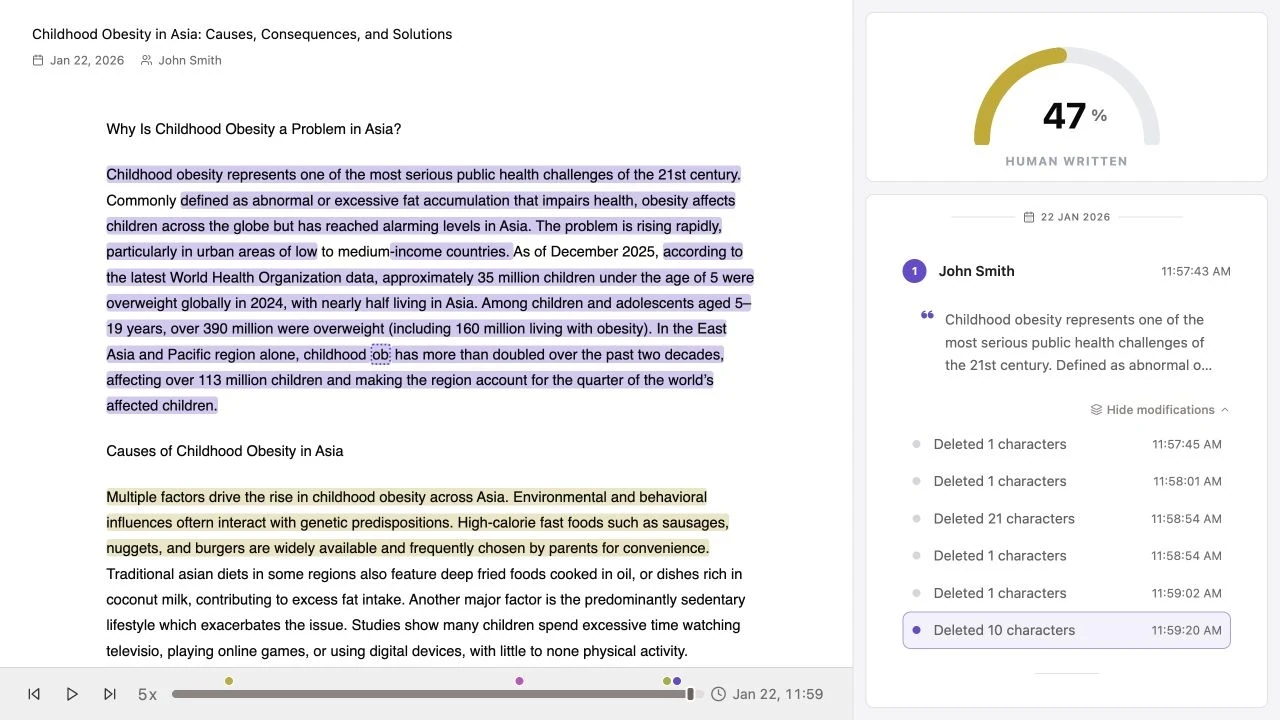
The human-written score shouldn’t determine a student’s grade on its own. Review the work and its revision history against your assignment criteria and classroom AI-use rules. Discuss any concerns with the student before drawing conclusions.
Why document rendering matters during review
Papers and projects often use headings, nested lists and tables to organize their content. When a review tool doesn’t display that structure properly, it’s harder to read the document and understand changes in context.
A quieter campus courtyard
Observation plan
●Observe lunch breaks
○Count occupied seats
○Note areas of shade
Trial proposal
Change | Trial |
Benches | Move two into shade |
Central path | Keep open |

Figure 1. Courtyard sketch
Turingo preserves supported text styles, lists, and tables during replay. Turnitin Clarity also supports headings, lists, tables, and images. In Turingo, images currently appear as placeholders that reserve their space; the original artwork isn’t displayed.
Turingo vs the alternatives
Turingo vs Draftback
Draftback is a Chrome extension and a precursor to today’s AI-focused writing-process tools. It has the most limited analysis capabilities of the tools compared here: replay and statistics, with interpretation left to the reviewer. It replays the history Google Docs already records, including work written before the extension was installed, but doesn’t automatically flag suspicious events. This can work well for occasional document checks. Turingo gives each tracked passage its own modification history, so you can open later edits directly. Draftback uses subscriptions; Turingo also offers a separate free revision-history player that matches Draftback’s core replay capabilities, with no Chrome extension needed.
Turingo vs Turnitin Clarity
Turnitin Clarity is accessed through your institution’s LMS and fits courses where students already write in Clarity assignments. Its Writing Report labels external pastes changed or unchanged, telling you whether a paste was edited. Its general replay also shows additions and deletions across the document. Turingo lets you inspect how a specific passage evolved, with each later edit and deletion linked to the original tracked insertion.
Turingo vs GPTZero Writing Replay
GPTZero’s Google Docs replay uses a Chrome extension. It can suit occasional reviews when you want automated help interpreting the writing process. Its Writing Report includes replay, typing analysis, paste cards that identify who inserted the text, and an investigation chat that draws on document history. Turingo keeps later modifications with the original tracked passage and uses the amount of pasted text that remains in its score.
Choose a tool for your needs
The choice depends on where students write and how much time you can spend reviewing their work. For regular Google Docs reviews, Turingo provides automatic analysis and a linked history of each tracked passage without an extension.
Try the free Turingo Replayer to look through a Google Doc’s available history without an extension or a Turingo account. Register for Turingo’s detailed analysis for tracked passages, modification histories, and the human-written score. The replayer introduction explains what’s included for free.
About this comparison
This article is published by Turingo. Maya’s example is fictional, with each draft’s score calculated by Turingo’s analyzer. The passage cards are illustrations. The screenshot comes from Turingo’s existing sample report, and the formatting comparison uses Turingo’s renderer alongside a text-only illustration.